
New Underune 0.1.0 is here — read the release notes

Every chapter. Every mod.
One launcher.

Underune finds Undertale and Deltarune in your Steam libraries, starts any Deltarune chapter directly and installs mods into separate instances — so your original game is never touched.

  • Windows 10/11 (64-bit)
  • Works with your own Steam copies
  • No game files included

This is a live recreation of the app — click around: launch a game, pick a chapter, switch themes.

3
Steam apps recognised: Undertale, Deltarune and the Deltarune Demo
0
files ever written to your Steam installation
4
mod sources: GameBanana, Game Jolt, community and local files
117
automated unit & integration tests passing in v0.1.0

What it does

From double-click to playing in three steps

Underune sits between you and your games. It knows where they are, keeps your modded setups apart from the original, and starts exactly what you picked.

  1. 01

    Detect

    Underune reads Steam's own library files on every drive, finds Undertale, Deltarune and the Deltarune Demo, then verifies the actual game files and reads their versions.

  2. 02

    Choose

    Play Vanilla or an instance — a private copy with its own mods and saves. For Deltarune, pick the chapter you want to start in.

  3. 03

    Play

    Press Launch. The game starts, shows up in the Activity list with a Stop button, and lands in Recently played.

Built for both games

Two games, two rulebooks.
Handled separately.

Undertale and Deltarune don't work the same way, so Underune doesn't pretend they do. Each game has its own detection, launch, save and modding rules.

Steam app 391540UNDERTALE.exe
  • Version read from the game's data, never guessed.
  • Instances that really run from their own folder — Underune adds the small Steam ID file the copy needs, so Steam doesn't restart the original.
  • Separate saves by a journaled save swap. If your PC crashes mid-swap, Underune repairs it on the next start.
  • Mods for music, sprites (via xdelta patches) and added files.

Undertale instances need Steam running, and instances with separate saves run one at a time.
Steam app 1671210Demo: 1690940
  • Chapters detected from your files — a new chapter folder shows up automatically.
  • Direct chapter launch using the same mechanism as the game's own chapter select.
  • Separate saves per instance, and several Deltarune instances can run at the same time.
  • Deltarune Demo support, kept fully separate from the full game.

Mods can target a single chapter — Underune asks which one when a file could belong to several.

Chapter selection

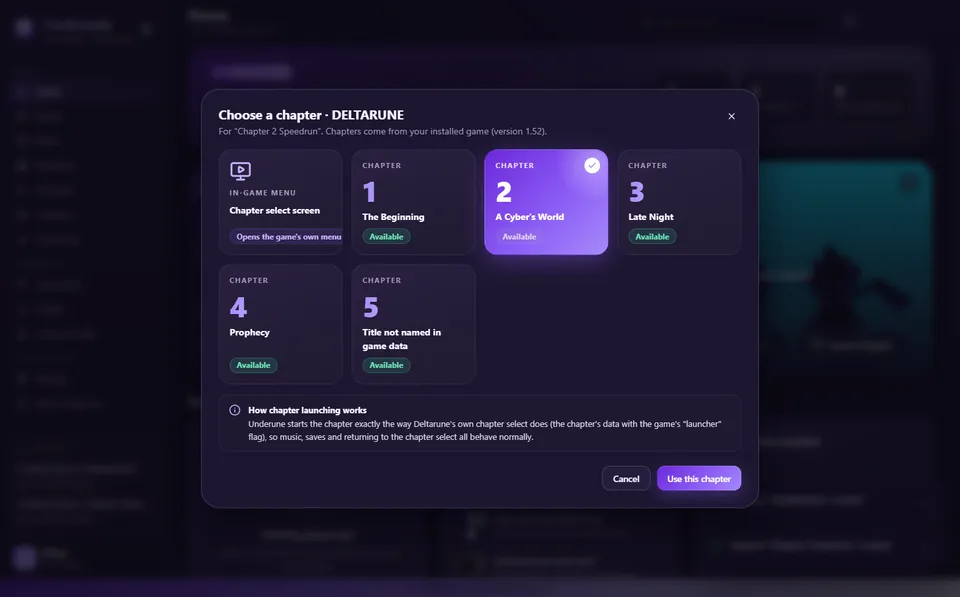
Jump straight into Chapter 2.
Or 4. Or whichever you like.

Pick a chapter before you press Launch and Underune starts it directly — music, saves and the return to the chapter select all behave exactly as they do in the game.

  • Only chapters actually installed on your PC are offered.
  • Titles come from the game's own data — nothing invented.
  • Remembered per instance, so each setup starts where you want it.
  • Prefer the game's menu? Keep In-game menu selected.
Open the chapter selector in the preview
The Underune chapter selector listing Deltarune chapters 1 to 5 with their titles and availability Real screenshot

Features

Everything you need to play, mod and share

One app for the jobs you'd otherwise do by hand in Explorer — done safely, with backups and verification at every step.

Automatic Steam detection

Reads the registry, every library in libraryfolders.vdf and each game's app manifest — any drive, any Steam folder. A game only counts as installed after its files are verified.

InstalledNot installedDamagedUpdatingSelected manually

Instances

Private copies with their own mods and saves. Rename, duplicate, set a default, verify or delete — the original is never touched.

One-click mods

From GameBanana, Game Jolt, an Underune community server or a local zip, 7z, rar or xdelta file.

Modpacks

Install many mods together, all or nothing. Export any instance as a .underunepack.

Backups & restore

Originals are stored before a mod changes them. Restore points, one-click Reset to vanilla.

Download manager

Queue, pause, resume and retry. Nothing is marked complete until its checksum matches.

Five themes, your accent

Purple, Cherry Blossom, Night Blossom, Pure White and Crimson — plus a custom accent colour, optional animations and background glow.

Safe by design

Your Steam folder stays exactly as it was

Mods only ever go into instances. Every install follows the same careful path — and if anything fails, the instance is rolled back.

  1. Downloadresumable
  2. VerifyMD5 / SHA-256
  3. Inspectsafe archive read
  4. Blockexecutables & scripts
  5. Back uporiginal files
  6. Applystaged + journaled
  7. Verifyor roll back

A launcher appears. It already knows where your games are.

It promises not to touch your save files.