
Installation guide
From download to playing in six steps
Takes about two minutes. You'll need Windows 10 or 11 and Undertale or Deltarune from Steam — or the free Deltarune Demo.
-
1
Download the installer
Get Underune-Setup-0.1.0.exe (108.8 MB) from the download page. Your browser saves it to your Downloads folder.
Want to be sure the file arrived intact? Compare its SHA-256 checksum with the one on the download page.
Download 0.1.0 -
2
Open the installer
Double-click the file. Because the installer isn't code-signed yet, Windows may show "Windows protected your PC".
- Click More info.
- Check that the app is Underune-Setup-0.1.0.exe, then click Run anyway.
This is normal for new, unsigned apps. Code signing is planned.
-
3
Follow the installer
The setup asks two simple questions:
- Who to install for — choose Only for me (recommended, no administrator rights) or Anyone who uses this computer.
- Where to install — keep the default folder or pick your own.
Click Install. Desktop and Start-menu shortcuts are created, and Underune starts when setup finishes.
-
4
Open Underune
Underune opens automatically after installing. Next time, use the Underune shortcut on your desktop or search for it in the Start menu.
Underune itself never needs administrator rights.
-
5
Let Underune detect your games
On first start Underune scans Steam: it finds every library folder on every drive, reads the game manifests and verifies the files. Detected games appear on Home with their version.
- Game missing? Go to Games → Rescan Steam.
- Installed outside Steam's libraries? Use Settings → Games → Change… and pick the folder. It's verified before it's saved.
- Games that aren't found stay locked — Underune never launches an unverified installation.
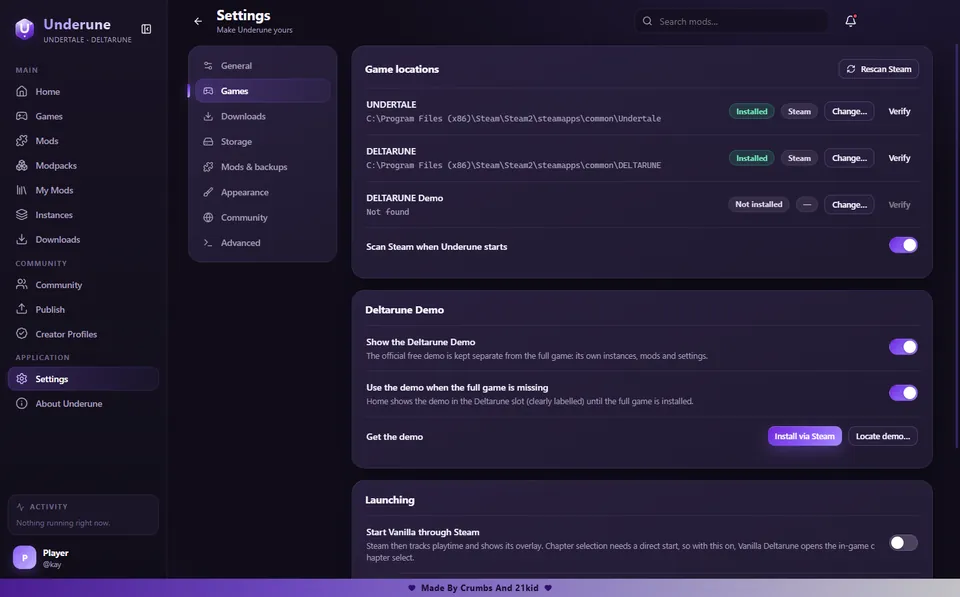 Real screenshot
-
6
Configure and start playing
- On a game card, pick Vanilla or an instance and press Launch.
- For Deltarune, press Select Chapter to start a specific chapter, or keep In-game menu.
- Want mods? Instances → Create Instance makes a private copy, then install mods into it from Mods.
- Personalise theme, notifications, downloads and more in Settings.
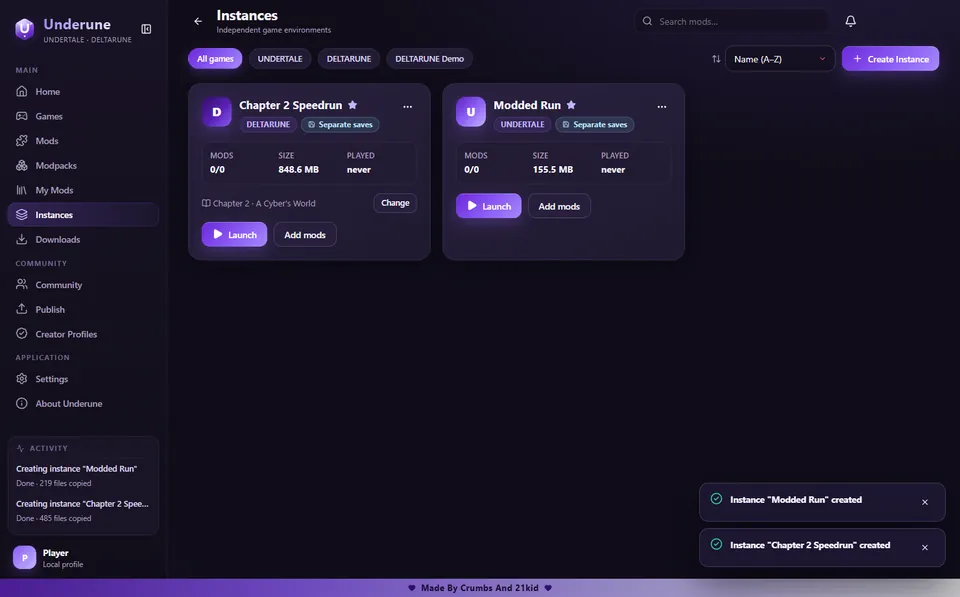 Real screenshot
No full Deltarune?
Use the Deltarune Demo
If Underune doesn't find the full game, the Deltarune section offers the official free demo instead of staying locked.
- Open Settings → Games → Deltarune Demo.
- Make sure Show the Deltarune Demo and Use the demo when the full game is missing are on.
- Click Install via Steam — Steam installs the free demo. Already have it somewhere else? Use Locate demo….
- Back in Underune, press Rescan Steam. Home now shows the demo in the Deltarune slot, labelled DEMO.
- Select Chapter lists only the chapters included in the demo.
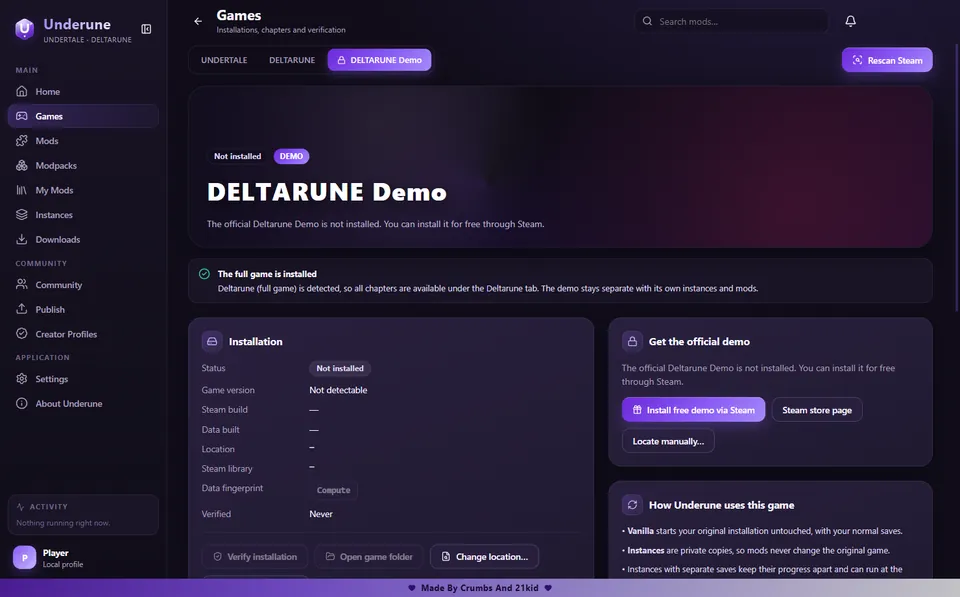 Real screenshot
Troubleshooting
If something doesn't work
A game shows "Not installed"
Make sure Steam finished installing it, then press Rescan Steam. If it lives outside Steam's libraries, set it with Settings → Games → Change….
A game shows "Damaged"
Required files are missing or unreadable. Use Verify integrity of game files in Steam, then Verify in Underune.
An Undertale instance won't start
Start Steam first — Undertale instances need it running. Only one Undertale instance with separate saves can run at a time.
An xdelta patch won't apply
Some patches use secondary compression. Point Settings → Mods & backups → xdelta3 at an xdelta3.exe.
A mod broke an instance
In My Mods, disable the mod, use a restore point, or Restore original files. Your Steam installation is never touched.
Need to report a bug
Open Settings → Advanced → Logs and use Export diagnostics. Logs never contain passwords or tokens.